Invoice Number
Invoice Number
The Invoice Number tab in the Stack Console allows administrators to define custom invoice numbering formats for different branches. This ensures consistency and clarity in financial documentation. You can set a custom prefix, choose a date-based format, and control the next invoice number all within system limits.
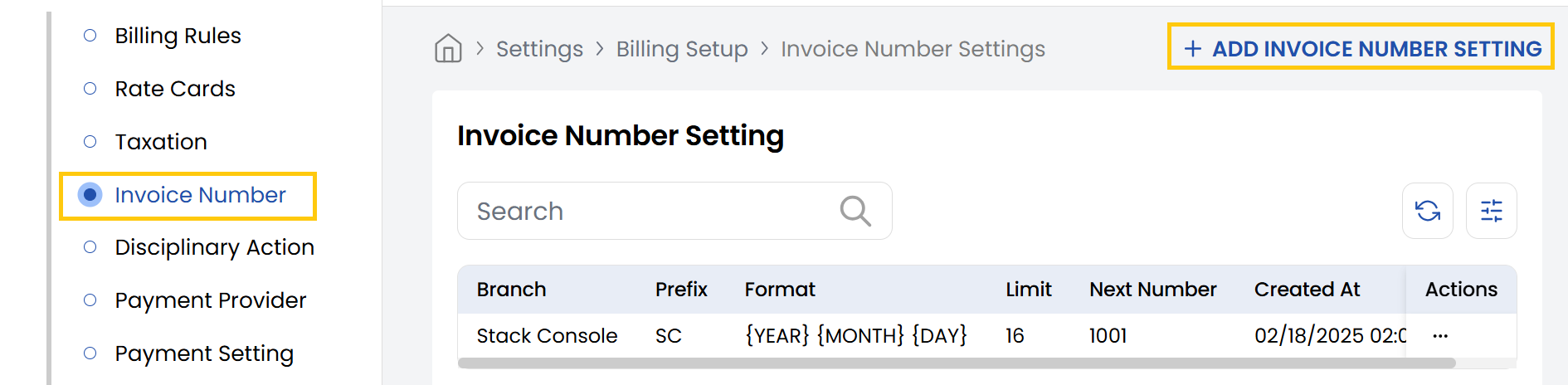
- From the left-hand side of the page under the Billing Setup section, click on Invoice Number to view the list of invoice settings.
- To create a new invoice setting, click on Add Invoice Number Setting.
- Select Branch: Choose the branch for which you want to set a custom invoice numbering scheme.
- Custom Invoice Prefix: Enter a short, unique prefix for the invoice number (e.g., SC for Stack Console).
- Custom Invoice Numbering Format: Choose the date placeholders to include in the format (Example format: (YEAR MONTH DAY) results in 20250521).
- Next Invoice Number: Enter the starting number from which the invoices should continue (e.g., 1001). Make sure the total length (prefix + date + number) does not exceed 16 characters.
- Invoice Number Preview: The system will auto-generate a preview (e.g., SC-20250521-1001) to help confirm the structure.
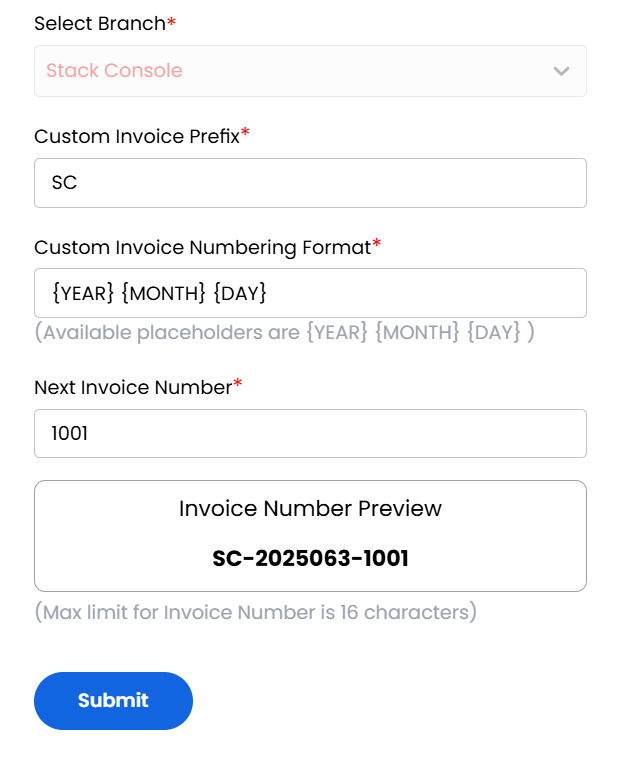
Review the preview and input values. Click Submit to apply the invoice number settings for the selected branch.
Conclusion
The Invoice Number section provides flexible customization of invoice identifiers to meet organizational requirements. For invoice numbering assistance, contact Stack Console support.